Search This Blog

Showing posts with label Android. Show all posts

Nokia reborn: Nokia’s new Android launcher is wonderfully simple and shockingly innovative


On June 19th of this year, Nokia was reborn. The company that had been known for years as a cell phone pioneer had sold off its devices business, and the world was waiting to see what new paths Nokia might take. There are a few, as it turns out, but one of them saw the company release a surprisingly innovative newAndroid app this past summer, and it just got a big update that users will love.

Earlier this week, Nokia announced on its Z Launcher blog that the like-named app, which is the first stand-alone Android software Nokia has ever released, has been improved in several key areas. For those who did not see the original news, Nokia’s Z Launcher app is a nifty Android launcher that makes accessing the contacts you correspond with most frequently and your most commonly used apps a breeze.

Here are the full details of Nokia’s new Z Launcher update, as noted in the company’s blog post:
  • Performance improvements
  • Speed improvements across the board!
  • Faster startup
  • Faster loading of apps, contacts, and websites on the homescreen
  • Faster first-run performance, especially on lower-end devices
  • Design enhancements
  • New animations
  • Going to homescreen, launching apps (we are still working on these, please let us know what you think in feedback)
  • Improved contacts search and listing in Z Launcher, more consistency in preserving your preferences across Z Launcher updates
  • Improved web search results
  • Improvements to “Call…” and “Text…” actions
  • Collapsing contacts so one person won’t take up two spots on your Home screen (so you won’t see “Call John” and “Text John” at the same time)
  • More reliable creation of “Call” and “Text” for the people you connect with the most
  • Reducing accidental app launch if you scribble too quickly
  • And many more bug fixes to improve the reliability of Z LauncherZ Launcher is currently in closed beta but those interested in trying it out as soon as possible can sign up here.

Samsung’s Galaxy Note 4 To Feature An Android L Style Multitask Switcher


Today is IFA 2014 in Berlin, and if you missed Samsung’s crazy presentation where they unveiled practically everything they are releasing for the rest of the year, then you missed out on a shed-load of things. The biggest announcement of all was hyped up like crazy before the event, and of course being the first week of September we all knew it was going to be the next Galaxy Note phablet. While Samsung announced not one but two new Galaxy Note phones, one of the big visual changes it showed off constantly were all the Android L-style menus, buttons and even the recents window throughout the presentation.

This led to some speculation that the Galaxy Note 4 and Note Edge would launch with Android L, but alas it just looks like Samsung is prepping its user base to get used to a few new design elements found within Android L instead of packing the full-fledged OS in the phone out of the box. Both phones run Android 4.4.4 KitKat, so here we’re looking at the recents window from Android L, which is a revolving carousel that spins vertically to reveal opened windows and apps instead of the current vertically-paginated view found on most Android devices out there. While this is mostly just a visual change, the important functional change Google made with recents in Android L is that they opened up apps to display themselves more than once in the recents menu. This allows apps, such as Chrome or another browser for instance, to display all open tabs in the recents window, effectively giving you seamless control over all open things on your phone.

As is usual with Samsung it’s not entirely the same layout as the one Google is using in Android L, and there’s a couple of reasons for that. First off on the bottom of the screen you’ll see two buttons: task manager and clear all recents. Task manager shows all open apps and services and basically gives you a dashboard-like overview of system resources used and lets a user quickly clear out the RAM if they’d like to. While this feature is entirely unnecessary in Android these days, it gives some users comfort in thinking they have more control over their phones. Close all recents is just a quick way to close all open apps so that things aren’t running in the background, a task not usually needed but sometimes handy.

Outside of that you’ll also find a little button in the top right of some app panes, denoting the new multi-window integration Samsung has added to make multi-window more accessible to users looking to use the feature. It’s a handy way to pack this into the OS rather than having to remember to press and hold the back button, which never made sense anyway. How quickly will Android L roll out to the Note 4 and Note Edge given these changes? We’re assuming there won’t be much of a change there, but it does take away some of the new visual flare Android L uses, possibly tiding users over until Samsung can get the updates out for its newest devices.

Google Releases the Google Now Launcher to the Play Store


Google has released a new app called the Google Now Launcher on to the Play Store that includes Chrome Beta browser and SoundSearch. This app is available available only on the Google’s own Nexus devices and Google Play Edition devices that will be running on Android 4.4 KitKat or above. The devices running on customs ROM’s that is based on KitKat like the CyanogenMod 11 may also be compatible.

From the name of the app, that suggests one of the main features of the Google Now Launcher is its quick access to Google Now. This application can be accessed with a just a swipe to the right while from the home screen. This is much easier and quick method than some of the other methods of accessing Google Now. The Google Now Launcher also includes support for saying “Ok Google” to initiate a voice search

This new feature doesn’t appear to be a big difference as the layout still remains the same with the Google Now panel and customizable home screen panels. However this app will be only available for the Nexus devices and GPe hardware only maybe we can see next version of this might be supporting many other Android devices.

So what do you think of this new Google Now Launcher app? Are you going to download and use it? Will it support your device? Already downloaded and using it? Comment in the comment section below and stay tuned for more updates and information. Earlier we also saw that Google is planning to make its Nexus 8 and stop making the 7 inch Tablets and is going with Asus to manufacture this Tablet and also planning to launch the Android 4.5 Operating System along with it. Let see how everything goes.

Download the Google Now launcher for your Android device from the Google Play Store – Link.

AT&T and T-Mobile HTC One users getting Kit Kat


HTC had hopes of getting the One updated to Kit Kat within 90 days time. This was referring to the carrier branded models in the US and Canada, but as we learned back towards the end of January -- HTC wasn't going to reach the self-imposed goal. At the time there was talk of a delay of one to two weeks and while the discussion had gone quiet, some updated details have recently been shared.

What we are seeing comes by way of Jason Mackenzie, President at HTC America.This time around he was answering user questions regarding the update for T-Mobile and AT&T users. It seems the T-Mobile users will be getting the update ahead of AT&T users, but not by much.

Mackenzie said the update would be coming "this week" for T-Mobile users, and "likely last week of Feb" for AT&T users. Simply put, if you are carrying either model of the One -- you may want to start keeping an eye out for an update notification. There is also the option to dive into the settings and check manually, however the simpler option is to wait and then follow the prompts.

To clarify, the update will be arriving as Android 4.4.2. Otherwise, while the information coming direct from Jason Mackenzie (on Twitter) seems to be a bit more up to date, we do also suggest keeping an eye on the HTC Software Updates page which details the entire process. With that in mind, that page still reflects the AT&T and T-Mobile updates as being in the certification stage.

Beautiful Widgets for Android OS


Upgrade your Beautiful Widgets for ★ FREE ★! Earn Getjar Gold by trying new free apps and spend it to unlock every Beautiful Widgets feature you want. You can also use in-app purchase with the Play Store.

Tons of widgets, tons of themes, just for you. Beautiful Widgets is your best friend for customizing your home screen. Make it personal, be unique & express yourself.


What's New:

What's in this version:- 5.2.3 (07/05/2013)
Default setting for 12/24 hours now use the system locale
Add 2 new tutorial pages about in-app purchases
Add ICS margins for 4x1 clock widgets
Fix bug when showing a theme with QR code
Fix crash when managing locations in Turkish language
Fix some wrong LifeStyles's values
Fix some minors fixes/crashes
-5.2.1 (02/05/2013)


For free, discover a lot of function :

- A dedicated screen for weather forecast with beautiful animations
- Precise information for your location using Accuweather data
- 3 different kind of widgets : Clock, Weather and Toggle Wifi
- 10 downloads for beautiful themes in a database for more than 2000+ different themes.

You want more, unlock these features for your app :

- More weather information like hours, moon-phases and lifestyles
- A new weather provider : Weather Underground
- More customization for your widgets
- More kinds of widgets
- Dedicated widgets in HD for your tablet
- Unlimited downloads of themes
- Rich notification for weather
- A DayDream Screensaver (for 4.2+) with weather information
- More toggle widgets for Wifi, Bluetooth, Brightness, GPS (shortcut), Silent, Vibrate, Rotate and a Timed Silence!
- Access to Web Theme Market with cloud to device communication: browse themes from your computer and apply it directly to your phone along with a new wallpaper!
- Access to Web Theme Mixer: create your own customized themes from the elements of the others themes
More than two thousands themes to beautify your widgets. You will be able to do multiple combinations with clock, weather, battery and toggle themes.

They loved Beautiful Widgets :

- Android Central: "We love Beautiful Widgets"
- AndroidGuys: "We’re already set to rename the app “Simply Stunning Widgets”"
- Android and Me: "Beautiful Widgets is one of the essential must-have Android apps, and has been for quite some time now. If you still haven’t managed to buy the app, there’s no time to waste."
- ZDNet: "The strength of Android is the ability to make the interface very personal, and Beautiful Widgets is the daddy of them all."
- FrAndroid: "Beautiful Widgets is excellent"

*** Important notes ***

This application is not working on the SD Card because it contains widgets, so please make sure you have enough free space on your device.


Doc & Dog for Android OS


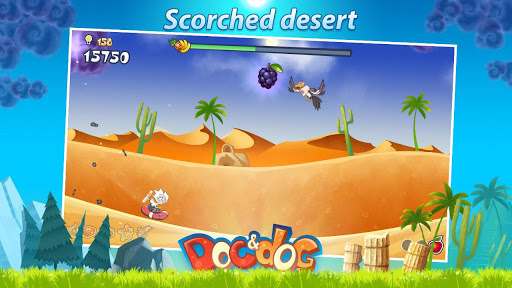
You are a Mad Scientist who in a matter of seconds can invent just about anything and build it from almost nothing. Just a couple of minutes ago, you had a makeshift rocket and a strong desire to get away from an uninhabited island. Getting away was simple enough; but the problem is your best friend, the most loyal Dog in the world, got left behind.
A regular scientist would be devastated. Even a good scientist wouldn’t know what to do in this situation. A genius would come up with a formula to avoid anything like this in the future. But a Mad Scientist is simply going to fly around the Earth and come back to the island to reunite with his canine partner. All he needs is a little bit of help...

Around the world in ten minutes! Vast seas, high mountains, scorched deserts, treacherous ice, and dangerous jungles -- nothing can stand between the two best buddies.
Doc & Dog has all the best features of the runner game genre - frantic gameplay, larger than life characters, an epic story, and awesome visuals.
Features:
✔ 4 air crafts
✔ 48 upgrades
✔ 5 decorations
✔ 6 boosts
Reviews:
Randy Basham
Awesome ★★★★★
This is a awesome game that you want to play more and more!!! Good job guys
Lita Meiliany
Superb ★★★★★
Worth to download... it's so much fun, !!


Update Gmail App for Android OS

The Gmail app for Android has been one of the most popular and best Email clients for Android phones, and the Google team has been sending updates with some best changes and performance improvements, but this time, the update has brought options to make the usage of the app far easier than earlier. The update is sent for the various Android versions, which includes the Android 2.2 and above, Android 4.0 ICS and above, Android 4.1 JB and above. The best part of this update is that the users can directly delete or archive or reply to a mail that has just arrived in the notification panel, and this all can be done from the notifications section rather than going to the app.

Gmail App Android Update
Gmail App Updates for Android versions:
  • The Android 2.2 and later version would have the new Labels API, advantageous for the 3rd party app developers. Apart from that, there have been a lot of performance improvements done.
  • Android 4.0 Ice Cream Sandwich and later will provide a faster searching of the mails and allows for searching the mails even when the device is offline. The app update comes with bug fixes and performance improvements too.
  • Android 4.1 Jelly Bean devices would see the update with the options to send replies, delete or archive mails directly from the notification section.
Another noticeable change is the font of the header title of the mail which looks clear and better to read than in the previous version, and this change is seen in all the versions of Android. Gmail had sent an update a few months back when swyping the mails to the right or left in the app did the job of deleting and archiving the mail, but now with this update, the job gets easier and one wouldn’t need to go to the app all the time for every mail they receive.
To update the Gmail App of your Android Phone:
You need to go to the Google Play Store, and there go to the My Apps section where the update would be available. If you didn’t see the update message already, search for the updates by refreshing the list and it would then let you know about the available update for the Gmail app. Play Store Link

Download Latest Google PLAY Store 3.10.10 for your Android – APK Files

Download Latest Google PLAY Store 3.10.10 for your Android – APK Files for Every Version


Google PLAY LogoFrom Android Market Place to Google PLAY Store and to an endless version numbers, the version update saga continues and on the same lines, here comes an another update for the Google PLAY Store which is dubbed as 3.10.10 and in this article we will be checking out on what are the detailed change log of this update along with the step by step procedure which will help you to upgrade your PLAY Store version with this latest one. Please be informed that this update of PLAY Store has only been rolled out to some specific countries as of now and there is no exact timeline on by when this update will be pushed to the other countries.
Update (27/11/2012):
There is an all new update and is dubbed as 3.10.10. We have mentioned the features below along with the download link of APK of Latest Google PLAY Store. After downloading, just place the same in your Android device and open the same in your device to follow the on screen instructions for updating the same.
New Features in Google PLAY Store 3.10.10:
  • Force Close Errors while Switching the Data connection has been addressed,
  • Update Bug has been fixed,
  • Google Ads Issue has been resolved,
  • Much More optimized with stability fixes
Update (17/11/2012):
New Features in Google PLAY Store 3.10.9:
Just few days after Google recently came up with its new PLAYS tore update, today it’s time for one more and this time too there are some core features which have been accommodated. One the lines of transparency, while installing the apps from PLAY Store, an additional permissions like,
  • Approximate Location (based on the Network) &
  • Precise Location (based on the GPS/ Network Location)
Are being prompted. Apart from the above two permissions, there are no new user interface changes or noticeable additions in the all new PLAY Store 3.10.9 version of Google PLAY Store. So, let’s check out on how exactly you can install this all new Google PLAY Store.
Update (03/11/2012):
New Features in Google PLAY Store 3.9.17:
Google Play Store now has been upgraded to the newer version which is dubbed as 3.9.17 version, though there are not many significant changes compared to the precious one but yest there are stability fixes which have been done and also issues pertaining to favoriting the apps has been fixed. Additionally, issues pertaining to Icon Set diplay wherein Google Nexus 10 and Google Nexus 4 were facing issues as 144 x 144 px icon was pixelating. You can refer to the links mentioned below so as to download this apk in your Android device.
Updated (18/10/2012):
New Features in Google PLAY Store 3.9.16:
An all new update is awaiting your Android smartphone for your Google PLAY which though doesn’t come with any significant make overs but it comes with some stability fixes and some key features are added which were missing. We have summed up a detailed feature list,
Wish List: With Wish List feature, one can bookmark all their favourite apps, music, books and other Play content.
My Apps: Previously, every app which you downloaded gets into your “My Apps” list, but with the new update, you can now delete all the apps which you feel that you don’t want to see in your My Apps List.
Refreshed Notifications: Notification system has been updated a bit after several Google PLAY Store updated as the notifications can now be expanded than just a notifier prior to this update.
(23/08/2012) New Features in Google PLAY Store 3.8.17:
  • Supports Gift Cards,
  • Can now bookmark apps and create a wishlist,
  • Force Close Error fixes for Jellybean users,
  • Google Mobile Ads option works effectively than 3.8.16,
  • Supports virtually all Android Firmware versions and devices which are on Android 2.1 & higher,
  • Minor change in the user interface along with the bug fixes which again we are not sure of any change logs in the bug fixes
So let’s check out on how you can install this all new Google PLAY Store in your device.
features-6-3
Procedure to Upgrade Google PLAY Store to the Latest 3.9.16 version:
  • Download Google PLAY Store 3.9.16 APK from below to your computer. Once downloaded, connect your device to the computer using the original USB cable and transfer the APK file in your device. You can also alternatively download the APK in your device and open the same so as to follow the on screen instructions.
Screenshot_2012-08-19-16-53-51 Screenshot_2012-08-19-16-53-59 Screenshot_2012-08-19-16-54-09 Screenshot_2012-08-19-16-54-18 Screenshot_2012-08-19-16-54-44 Screenshot_2012-08-19-16-54-53 Screenshot_2012-08-19-16-55-07 Screenshot_2012-08-19-16-55-16 Screenshot_2012-08-19-16-55-23
  • Now, disconnect the device and navigate to the placed APK file which you placed in your Android device to open the same and follow the on screen instructions as shown above. Please note that if just by any chance the Play Store apk doesn’t support, then you will have to wait till the time its Officially pushed for your device.
So there you go you have now successfully upgraded your Google PLAY Store in your device with the latest firmware version of 3.8.17. Do let us know in the comments section just in case if you face any issues in the process of installing this all new Google PLAY Store.
Aug 16, 2012 :
PLAY New LogoGoogle PLAY Store Web version, after getting a major overhaul when it comes to the feature list and in the due course of this article we will be checking out the same. There are array of added features which got added and in this article we will be checking out the same. This all new version of Google PLAY Store is dubbed as 3.7.11 and is being extracted from Jellybean 4.1 update release. In the last two articles, we saw on how to upgrade your Galaxy Nexus with Jellybean 4.1 release and also on how you can download and set default wallpapers of Jellybean 4.1 Update. So, let’s proceed and check out on how you can install this all new Google PLAY Store in your Android.
Update : 15/08/2012 – The Play Store App has been upgraded to 3.8.15 which you can download below. The new version supports Gift Cards which means that you can now help your friend in getting paid apps for free by gifting them.
Update : 29/07/2012 – This app is upgraded to 3.7.15 from previous versions and we have updated the download link below.
This all new Google PLAY Store comes with the Magazines and TV Shows too with an improved user interface. Though most of the devices and tablets will support this all new Google PLAY Store APK but just in case if it doesn’t support your device, then do report us the same in the comments section below. Few days back, we saw on how you can update with the 3.4.6 , 3.4.7 & 3.5.15 updates for Google PLAY Store.
Note: Please be informed that updating the PLAY Store manually by following the instructions will not void the warranty in any manner. As of now the official PLAY Store update of 3.7.11 is available for US users but manually, you can apply the same by following the instructions mentioned here.
Features of Google PLAY Store
  • Major UI changes in 3.5.19 than all other previous versions,
  • Issues related to Force Close has been solved,
  • Google Mobile Ads issue for some users have been fixed,
  • Further optimized for slower data speed
  • More fluidic on Gingerbread 2.3 / ICS 4.0 devices than ever
Procedure to Update Google PLAY Store with latest 3.10.9 Version:
  • First up you need to Download Play Store 3.10.9 APK in your computer. Once downloaded, connect your device with the computer and place the same in your device.
  • Disconnect the device and navigate to the path where you have placed the APK file and then open the same.
      
  • With the help of above mentioned interactive screen captures, you can easily upgrade the PLAY Store in your Android phone.  As soon as the installation is done, you will be prompted to tap on the “Accept” button. Please note that just in case if it prompts you to select the option of “Unknown Sources” then you need to select the same.
Note: If just by chance the Play Store apk doesn’t support, then you will have to wait till the time its Officially pushed for your device.
Do let us know in the comments section just in case if you face any issues in the process of updating the PLAY Store. So there you go, you have now successfully updated your PLAY Store with the latest version.
Download Links: